Independent setup guide · not affiliated with Wavlink · no sign-in or phone call required
ap.setup / Models / WiFi 6 (AX) setup
Newest generation · WPA3

Wavlink WiFi 6 (AX) extender setup.

The WN583AX1 and AX3000 series bring higher throughput and WPA3 security, but log in exactly the same way as every older Wavlink extender.

Quick answer

Plug it in near your router, connect to its WAVLINK-XXXX WiFi, then open ap.setup or 192.168.10.1 and sign in with admin. The admin panel looks newer, but the login address and steps haven't changed.
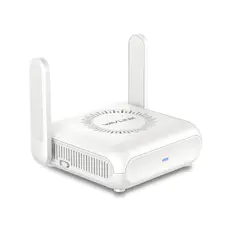
Wavlink white desktop WiFi 6 extender with two antennas
Which models this covers

The AX / WiFi 6 family

Wavlink's newest extenders add 802.11ax (WiFi 6) support and WPA3 encryption on top of the same Repeater/AP setup as older models.

WN583AX1 · Aerial D4X (AX1800)AX3000 series

The outdoor WiFi 6 unit, the WN573HX1 (Aerial HD6), is covered separately in the outdoor extender guide since it's PoE-powered and pole-mounted rather than a plug-in.

Before you touch the address bar

The 60-second prep

Skipping these is why the login page "won't load" for most people. Do them in order.

  1. Plug the extender into an outlet near your router.Keep it close for first-time setup — you'll move it to the dead zone afterward.
  2. Wait for the power light to settle.About a minute, until the LED stops flashing and holds steady.
  3. Connect your phone or laptop to the extender's own WiFi.Look for WAVLINK-XXXX or a network ending in _Ext. No password needed at this stage.
  4. Only now open your browser.You must be on the extender's network — not your home WiFi — for the setup page to appear.
Log in

The setup address

http://ap.setup
http://192.168.10.1

Type it in the address bar, not the search box. If ap.setup doesn't load, the numeric address does the same job.

When it asks for a password

On a new or freshly reset AX unit, the default is username admin or blank, password admin.

What's actually new

WiFi 6, WPA3 and mixed networks

security

WPA3

Enable it if every device you own supports it. If an older phone or laptop won't connect, switch to WPA2/WPA3-mixed in wireless settings.

speed

802.11ax throughput

You'll only see the speed benefit between the extender and WiFi 6 capable devices — older devices still connect fine, just at older speeds.

Repeater and Access Point modes work exactly as on older Wavlink units — see the general setup guide for a walkthrough of choosing between them.

Read the lights

What the LED is telling you

Solid green

Strong link to your router. Setup worked — go ahead and relocate the unit.

Amber / orange

Connected but weak. Move the extender closer to the router and re-check.

Red

No usable link to the router. Wrong WiFi password, or placed too far out.

Off / no light

Check the outlet before anything else.

LED colours and behaviour vary slightly by model — confirm against the label or manual for your exact unit.

When nothing loads

Reset and start clean

  1. Find the recessed Reset pinhole on the side or bottom — you'll need a paperclip.
  2. Hold it while the unit is powered on, roughly 8–15 seconds.
  3. Let it reboot fully.All settings, including WPA3, return to factory defaults.
  4. Begin again from "The 60-second prep."The default password admin works again after a reset.
Common questions

WiFi 6 (AX) extender FAQ

Does a Wavlink WiFi 6 extender use the same ap.setup login as older models?
Yes. The WN583AX1 and AX3000 series still use ap.setup or 192.168.10.1 with the default admin password — only the admin interface looks newer.
Do I need a WiFi 6 router to use a Wavlink AX extender?
No. It will happily extend a WiFi 5 or older router's signal, but you'll only see WiFi 6 speeds between the extender and WiFi 6 capable devices.
Should I enable WPA3 on my Wavlink AX extender?
Yes, if all your devices support it, since it's more secure than WPA2. If an older device fails to connect, switch to the mixed WPA2/WPA3 mode in the wireless settings instead.
Who wrote this

Why you can trust this page

About this guide

An independent resource maintained by the apsetupwavlink.com team, focused on clear, no-nonsense help with Wavlink extender setup. Not affiliated with Wavlink.

Independent help resource. Not the official Wavlink site and not affiliated with or endorsed by Wavlink. Model names are trademarks of their owner and used here only to help users identify their device.